
Overview
Gevme’s invoicing system has traditionally used a fixed structure to maintain consistency and clarity across all event transactions. However, we recognize that event organisers and their buyers often require additional custom fields—especially tax-related details—to be included on invoices. To address this need, Gevme now supports adding custom tax fields into invoices through a simple, standardized naming convention.
This enhancement allows you to seamlessly include buyer-specific tax information without disrupting the invoice layout, ensuring compliance and clarity for all parties involved.
How the Feature Works
The new feature enables buyers to add custom fields to their invoices by defining buyer field names that follow a specific pattern:
invoice_field_****
- Any buyer field with a name starting with "invoice_field_" will automatically appear in the invoice.
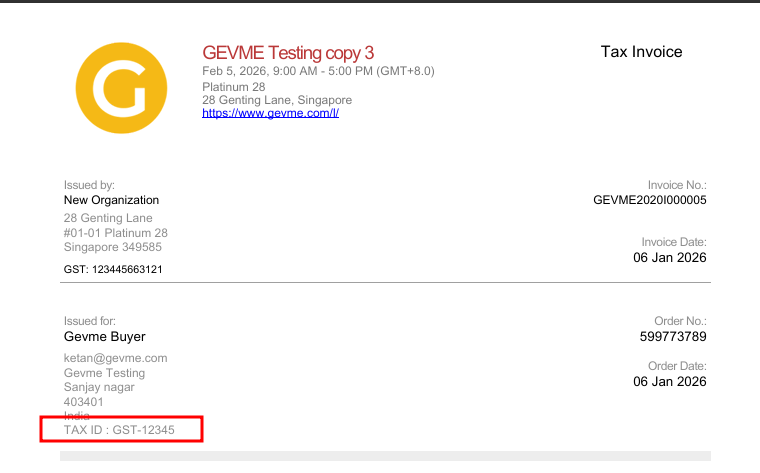
- These fields are displayed under the “Issued for” section, positioned below the existing buyer fields.
- The field name is sanitized by:
Removing the prefix invoice_field_
Replacing underscores (_) with spaces to improve readability
Example:
| Buyer Field Name | Values inserted by Registrant | Invoice Display |
|---|---|---|
| invoice_field_TAX_ID | GST-12345 | TAX ID: GST-12345 |
| invoice_field_VAT_Number | 987654321 | VAT Number: 987654321 |
If a field contains an array or multiple values, the system converts these into a comma-separated string for clear presentation.
Key Features
- Custom Field Recognition: Automatically detects buyer fields prefixed with invoice_field_.
- Dynamic Field Naming: Converts technical field names into user-friendly labels by replacing underscores with spaces.
- Flexible Data Types: Supports string values, numbers, and arrays (converted to comma-separated strings).
- Consistent Styling: Custom fields adopt the existing invoice font, size, and colour (grey) for a professional look.
- Layout Integrity: Limits on the number of fields and string length ensure the PDF invoice layout remains intact and readable.
- Positioning: Custom fields appear directly below the standard buyer information in the “Issued for” section.
Benefits for Event Organisers
- Tailored Invoices: Easily include tax IDs, VAT numbers, or other regulatory information required by different buyers or jurisdictions.
- Improved Compliance: Meet local tax and invoicing regulations by adding necessary custom fields without manual invoice edits.
- Enhanced Buyer Experience: Provide buyers with invoices that reflect their specific information, reducing confusion and follow-ups.
- Time Savings: Automate the inclusion of custom tax fields, minimising manual data entry and errors.
How to Set it Up
- Identify Required Custom Fields: Determine which tax or additional fields your buyers require on their invoices.
- Add the Additional fields for the Invoice in Gevme:
Form Type: Buyer Form
Field Type: Customised Fields and select the appropriate Field Type for the question
Field Name: invoice_field_TAX_ID
Field Label: TAX ID
Invoice Display: TAX ID: GST-12345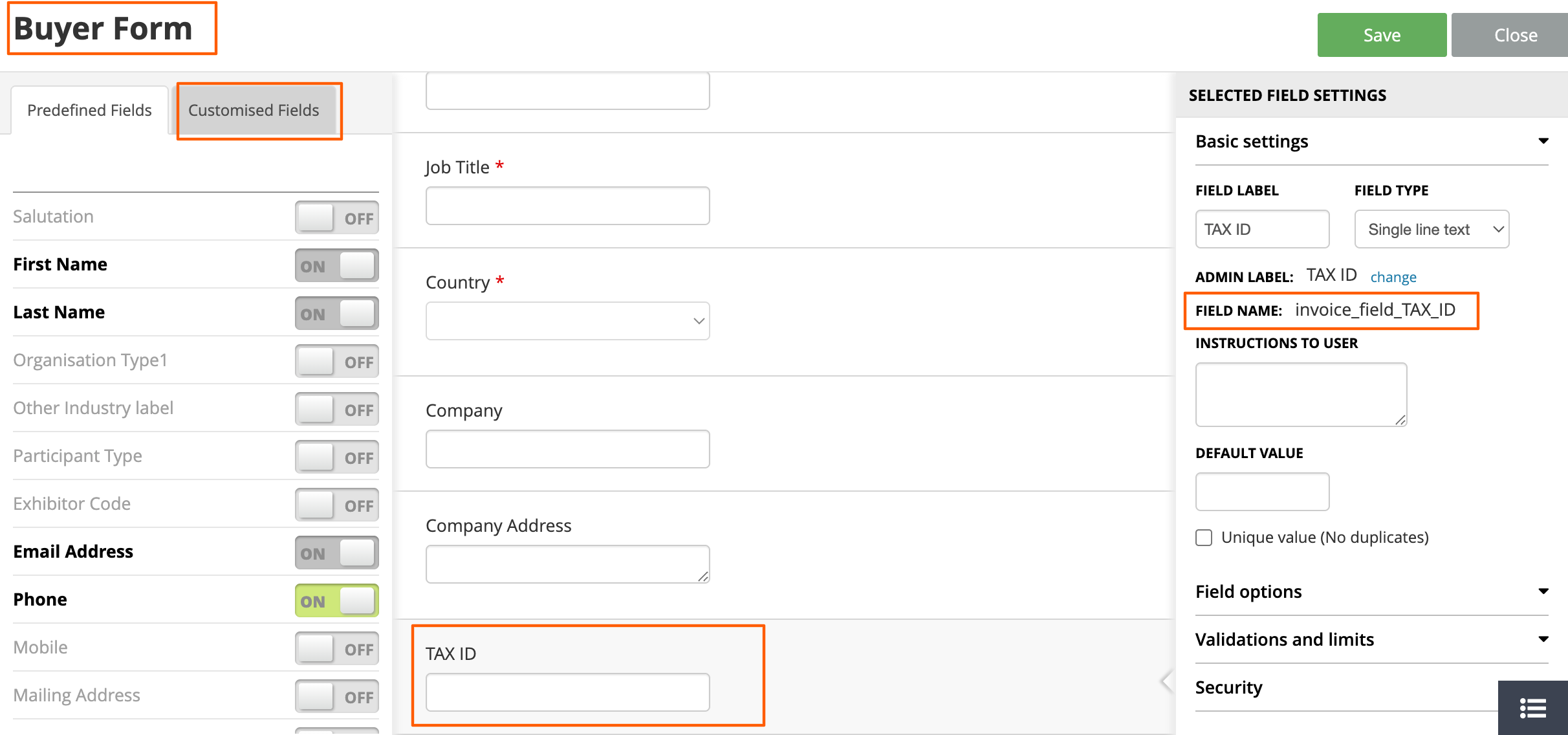
- Once the data is populated in the system, the above-configured field will be pulled into the "Issued for" section:
- Review Layout: Ensure that the total number of custom fields and their lengths do not disrupt the invoice format. If necessary, trim field values or reduce the number of fields.