
If you see the following message when trying to sign in to GEVME, your account has been temporarily locked as a security precaution.
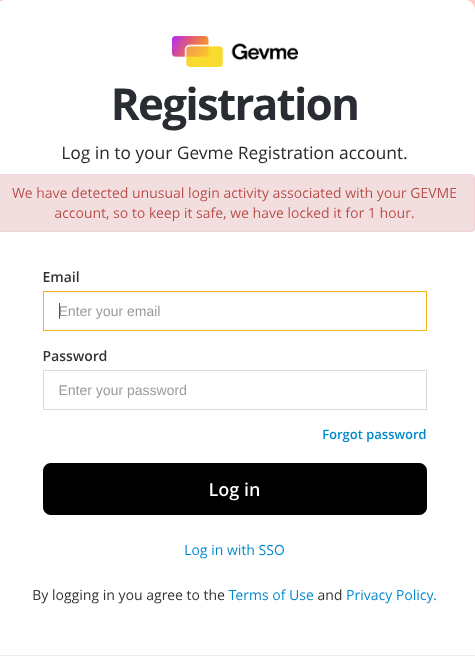
Why Is My Account Locked?
To help protect your account, GEVME temporarily locks accounts when potentially suspicious login activity is detected. This may happen if the system identifies:
- Multiple failed login attempts within a short period.
- Login attempts from different locations, devices, or IP addresses that appear unusual.
- Activity patterns that may indicate an unauthorised login attempt.
This security feature can also be triggered by legitimate activity, such as entering an incorrect password multiple times or signing in from a new device or network.
How Long Does the Lock Last?
The account lockout lasts 1 hour.
After the lockout period ends, you can try signing in again using your correct email address and password.
What Should I Do?
If the account is locked:
- Wait for the 1-hour lockout period to expire.
- Verify that you are using the correct email address and password.
- Use the Forgot Password option if the password is unknown or has been forgotten.
- Try signing in again after the lockout period ends.
Still Can't Sign In After 1 Hour?
If you're still unable to access your account after the lockout period:
- Clear your browser cache and cookies.
- Try accessing the account using a different browser or device.
- Confirm that the login credentials are correct.
- If the issue persists, contact GEVME Support at cs.reg@gevme.com for further assistance.
How This Security Feature Protects Your Account
Account lockout protection helps prevent unauthorised access by automatically responding to suspicious login activity.
- Automated Protection – Suspicious login activity is detected automatically.
- 1-Hour Lockout Period – Temporarily blocks access after suspicious login behaviour is detected.
- Login Activity Monitoring – Unusual sign-in attempts from different devices, locations, or IP addresses are monitored.
- Enabled by Default – This protection is automatically applied to all Gevme accounts.
Frequently Asked Questions
Can my account be unlocked immediately?
No. The lockout automatically expires after 1 hour. If you still cannot sign in after that, please contact Gevme Support at cs.reg@gevme.com
Can this feature be disabled?
No. Account lockout protection is enabled for all Gevme accounts and cannot be turned off, as it is an important security measure.
How Can I Prevent Future Lockouts?
To reduce the chances of your account being locked:
- Use trusted and secure devices and networks when signing in.
- Ensure the correct password is used when signing in.
- Avoid repeated login attempts when unsure of the password.
- Use the password reset option instead of making multiple unsuccessful login attempts.
- Keep your login credentials secure and do not share them with others.